Why Kafka and Not a Traditional Queue?

Alejandro Alonso Noguerales
Mar 24, 2026
01 — Where we left off
In Part 1 we saw the problem: a server that does everything synchronously blocks when heavy tasks grow. The solution is a broker that separates receiving from processing. Producer enqueues, Consumer processes, the user doesn’t wait.
But there’s a detail we left open. When we said “broker”, we didn’t specify which one. And it turns out not all brokers work the same way. There’s a fundamental difference between a traditional message queue (RabbitMQ, ActiveMQ, SQS) and a distributed log like Kafka. It’s not just a performance thing — it’s a difference in mental model.
02 — Two different philosophies
The key difference
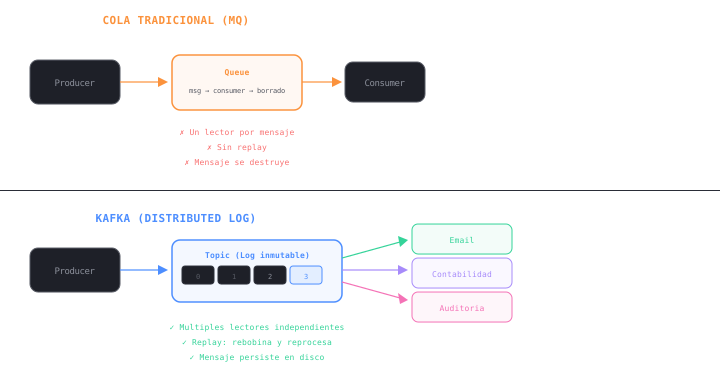
In a traditional queue, the message is destroyed when the consumer processes it. Once read, it’s gone. It’s like a mailbox: you take the letter out and it’s no longer there.
In Kafka, the message stays. Even after you’ve read it, it’s still there on disk. It’s like an accounting ledger: you read it, but you don’t tear out the page. Others can read it later, or you can re-read it if something went wrong.
| Criteria | Traditional Queue (MQ) | Kafka (Distributed Log) |
|---|---|---|
| Persistence | Ephemeral. Message deleted after consumer ACK. | Persistent. Message remains on disk per configured retention. |
| Delivery model | Push. Broker pushes messages to consumer. | Pull. Consumer requests messages at its own pace. |
| Replay | No. If you need to reprocess, the data no longer exists. | Yes. You can rewind the offset and reprocess the entire history. |
| Multiple readers | Limited. One message goes to one consumer (or requires fanout configuration). | Native. Multiple consumer groups read the same topic independently. |
| Ordering | Global (one queue) but loses order when scaling. | Guaranteed per partition. Each partition maintains strict ordering. |
| Philosophy | Pending task queue. | Historical record of business events. |
This doesn’t make Kafka “better” than RabbitMQ in the abstract. They’re tools for different problems. If you only need to decouple a heavy task and process it once, a traditional queue works fine. But when you have multiple services that need to react to the same event, when you need to reprocess historical data, or when the event itself is the source of truth for your system — that’s where Kafka changes the rules.
03 — The infrastructure: brokers, partitions, and replicas
To understand why Kafka can do all this, you need to see how it’s built underneath. It’s not a single server with a queue — it’s a distributed cluster designed to never lose data.
First things first: goodbye Zookeeper
If you’ve read about Kafka before, you’ve probably seen that it needed an external system called ZooKeeper to coordinate: controller election, metadata management, cluster configuration. These were two distributed systems you had to deploy, configure, and monitor separately. That made starting Kafka locally or in production considerably more complex.
That’s history now. Since Kafka 4.0 (March 2025), ZooKeeper has been completely removed. Its replacement is KRaft (Kafka Raft) — a consensus protocol built into Kafka itself that manages metadata as an internal topic. One single system. Getting started goes from “configure a ZooKeeper ensemble, set up TLS between both, deploy Kafka pointing to ZK” to simply starting Kafka.
What does this mean in practice? Fewer servers to maintain, one system to monitor, simpler runbooks, and faster deployments. Teams that have migrated report ~40% reductions in cluster setup time and ~20% in infrastructure costs from retiring ZooKeeper-dedicated nodes.
If you’re starting with Kafka today, this is transparent: KRaft is the default and only available mode. You don’t need to know anything about ZooKeeper. If you have an existing cluster on 3.x versions, migration to KRaft is well-documented and required before jumping to 4.0.
Broker
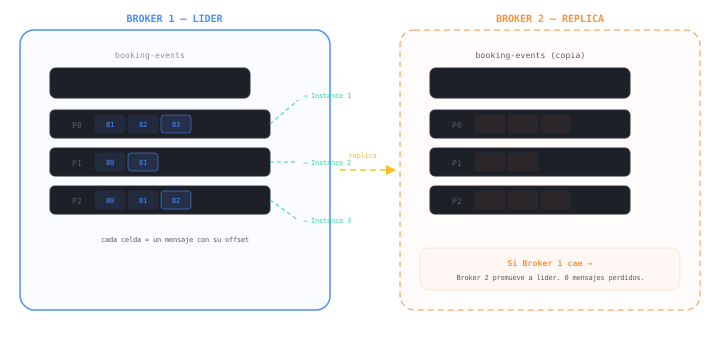
A broker is a Kafka server node. In production you always have several. One acts as leader for each partition, and the others maintain replicas. If the leader goes down, a replica takes over without losing a single message.
Topic and Partitions
A topic is the logical channel where you publish events (e.g., booking-events). Each topic is divided into partitions, which are the physical segments where data is stored. Partitions enable parallelism: if you have 3 partitions, you can have 3 consumers reading in parallel.
Offset: the bookmark
Each message in a partition has a sequential number: the offset. It’s like a bookmark: the consumer knows exactly where it is. If it crashes and restarts, it resumes from its last confirmed offset. If you need to reprocess data from a week ago, you move the offset backward.
Lag: how much you have left to read
Lag is the difference between the last published message and the last one your consumer processed. If lag grows and doesn’t recover, your consumer can’t keep up — you need more instances or to investigate what’s slowing it down.
04 — Consumer Groups: the scaling mechanism
This is where Kafka becomes truly powerful. The Consumer Group is the concept that enables two completely different patterns with the same topic:
Same group → Load balancing. If two consumers share the same group.id, Kafka distributes partitions among them. Each message is processed by only one. This is horizontal scaling: more instances, more throughput.
E.g.:
group.id = "booking-processor"with 3 instances → each reads 1 partition
Different group → Broadcast. If two consumers have different group.ids, both receive all messages. Each service consumes independently without interfering with the other.
E.g.:
"email-service"and"accounting-service"→ both read the complete booking-events
This is exactly what a traditional queue can’t do natively. In RabbitMQ you need to configure a fanout exchange, publish the message multiple times, or build extra architecture. In Kafka, the event is published once and each consumer group reads it whenever it wants.
Better than explaining it: try it yourself.
What to try
Same group: Send several events. Notice how each message goes to only one consumer (load balancing). Kafka distributes the partitions.
Different groups: Switch the mode and send events. Now both consumers receive all messages. Each service consumes independently.
Force error: Activate the toggle and send an event. The message goes directly to the Dead Letter Queue instead of to the consumers. That’s how resilience works: the main flow isn’t blocked.
05 — The design that matters: how do you organize your topics?
This was the real discussion we had when implementing Kafka. It’s not a theoretical question — it defines the maintainability of your entire system long-term. We evaluated two models:
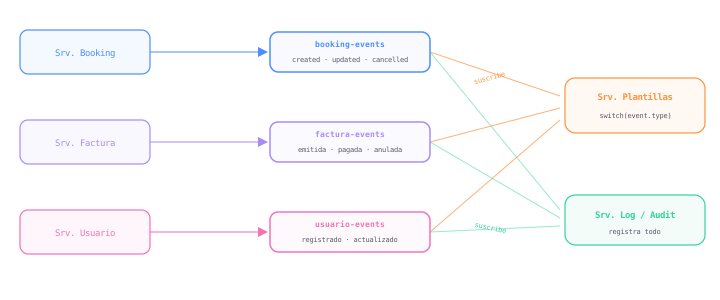
Model A — Domain topics (Event-Driven)
Each service publishes to its own topic, named after the business entity. The topic contains facts: what happened. The producer doesn’t know who’s going to read it or what they’ll do with it.
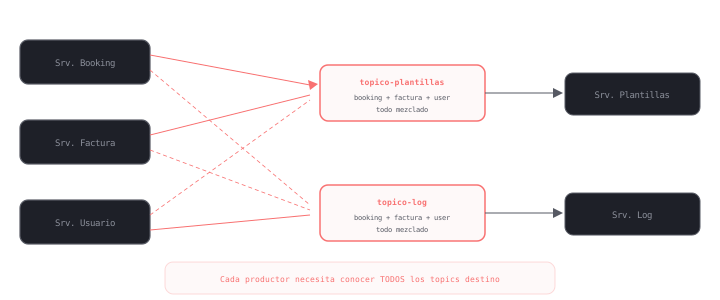
Model B — Action topics (Command-Driven)
In this model, topics are named after the destination consumer: topic-templates, topic-log. Producers send directly to each service’s “pending work” queue.
The real comparison
| Criteria | Model A (Domain) | Model B (Action) |
|---|---|---|
| Philosophy | Event-Driven. Topic contains facts. | Command-Driven. Topic contains orders. |
| Coupling | Low. Producer doesn’t know who consumes. | High. Producer knows the consumer. |
| New service | Subscribes to existing topic. 0 changes in producers. | Must modify each producer to send to new topic. |
| Ordering | Guaranteed per entity (partition key = booking ID). | Hard to guarantee: mixed sources in a single topic. |
| Maintenance | Centralized around data logic. | Scattered across multiple output flows. |
We chose Model A. The main reason: if tomorrow Marketing needs to send an SMS with each new booking, they just subscribe to
booking-events. No need to touch a single line of code in the Booking Service.Kafka should be a historical record of business events, not a queue of ephemeral tasks. Model A respects that philosophy; Model B contradicts it.
The real tradeoff: state machines
It would be dishonest to present Model A as the perfect option without tradeoffs. There’s one that directly impacted us: the producer needs to manage the lifecycle of its entities with a state machine.
When you publish facts to a domain topic, you as the producer are responsible for the sequence of events making sense. The Booking Service can’t publish a booking.cancelled if the booking never went through booking.confirmed. You need to validate transitions internally before emitting the event.
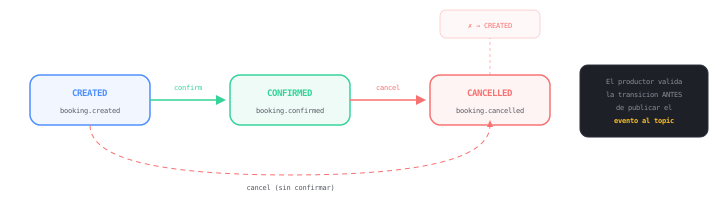
With Model B this isn’t necessary. If you use action topics, the producer sends a direct order: “generate the confirmation template”. It’s an explicit command. No ambiguity, no sequence to validate, no state machine. The consumer simply executes.
So why did we choose Model A if it adds complexity?
Because the state machine should already exist in your domain service. A booking has a lifecycle with or without Kafka — if you allow cancelling a booking that was never created, you have a business bug, not a messaging problem. Model A simply forces you to make it explicit. Model B hides it, and that’s worse long-term.
The extra cost is real but bounded: you pay it once in the producer. In return, you gain total decoupling on the consumer side — which is where the system grows and becomes hard to maintain.
06 — Resilience: when things fail
In a distributed system, failure isn’t an exception — it’s a certainty. Kafka gives you the tools to manage it, but implementation is up to you.
Schema Registry. A server that validates each message meets a strict contract (Avro, JSON Schema). If the Booking service changes the event format without notice, Schema Registry rejects the message before it enters the topic. Prevents deserialization errors in production.
Idempotency. If a consumer processes a message and crashes before confirming the offset, Kafka will retry. Your logic must handle receiving the same event twice without duplicating the invoice. Solution: validate processId before executing the action.
Dead Letter Queue (DLQ). When a message fails repeatedly (corrupted format, dependency down), you send it to a special topic: the DLQ. It stays available for manual inspection without blocking the main flow. Rule: after N failed retries → DLQ.
07 — Summary
Kafka isn’t a faster message queue. It’s a model change: your events are the source of truth, they persist, and each service consumes them at its own pace without interfering with others.
If you only need to decouple a heavy task and process it once, a traditional queue is enough. But if your system needs multiple services reacting to the same event, the ability to reprocess historical data, and architecture that scales without producers knowing about consumers — Kafka is the right tool.
What you should take from this article
Traditional queue = message destroyed on consumption. Push. One reader. Good for one-shot tasks.
Kafka = message persists. Pull. Multiple independent readers. Replay. Good for event-driven architecture.
Topic design: name by domain (what happened), not by action (who needs it). Producer publishes facts; consumer decides what to do. Tradeoff: producer needs a state machine to validate transitions — but that logic should already exist in your domain service.
Resilience: Schema Registry for contracts, idempotency with processId, DLQ with retries and exponential backoff.
KRaft: Since Kafka 4.0, ZooKeeper no longer exists. One single system to deploy, configure, and monitor. If you’re starting today, the barrier to entry is much lower.